How to Eliminate Ground Loops in a Production Rig
A practical guide to diagnosing and eliminating ground loops and 60 Hz hum in a production rig, with isolated power, balanced cabling, and ground lifts.
Music Gear Specialist Review Desk
Gear Research & Analysis
ℹ️ Affiliate Disclosure: Music Gear Specialist earns from qualifying purchases through Amazon and other partner links. This doesn't affect our recommendations—we only suggest gear we'd use ourselves.
As an Amazon Associate we may earn a commission from qualifying purchases made through links on this page, at no extra cost to you.
That low, steady buzz sitting underneath your mix isn’t always a bad cable or a noisy amp. In a production rig — where keyboards, audio interfaces, computers, guitar amps, outboard processors, and a mixer all share power and audio paths — the most common culprit is a ground loop: a sneak current path that turns your shielded audio wiring into a hum antenna. This guide walks through what ground loops are, how to find them methodically, and how to eliminate them without compromising safety. It’s a research-based walkthrough drawing on established pro-audio interconnection practice and manufacturer documentation, not a hands-on gear review.
What a ground loop actually is
A ground loop forms whenever two or more pieces of equipment are connected to ground through more than one path, and those ground points sit at slightly different voltages. Current then flows along the audio cable’s shield between the devices, and that shield — which is supposed to be a quiet reference — picks up electromagnetic interference and impresses it onto your signal as hum.
In North America this hum lands at 60 Hz (and its harmonics at 120 Hz, 180 Hz, and up); in much of Europe, Asia, and Australia it sits at 50 Hz. That frequency signature is the first clue you’re chasing a ground loop rather than, say, single-coil pickup noise or fluorescent-lamp buzz.
The classic industry reference on this is Rane Note 110, “Sound System Interconnection”, which lays out the balanced/unbalanced interconnection rules most professional installations follow. The application notes from Jensen Transformers, written by transformer designer Bill Whitlock, are the other canonical source for understanding why ground loops form and how audio transformers stop them.
Why production rigs are ground-loop magnets
A guitar plugged into a single amp rarely has a ground loop, because there’s only one device drawing power and only one audio path. A production rig is different. By definition you have:
- Multiple devices on multiple outlets. If your interface is on one wall outlet and your keyboard amp is on a separate circuit across the room, the two ground references can differ by tens or hundreds of millivolts — more than enough to drive current down an audio shield.
- A mix of balanced and unbalanced gear. Consumer and semi-pro gear (synth outputs, guitar pedals, unbalanced mixer inserts) uses TS and RCA connectors whose shield is also the signal return. Professional gear uses balanced XLR and TRS, which rejects common-mode noise — but only when both ends of the connection cooperate.
- Computers in the signal chain. A laptop or desktop connected to a USB interface and also to a monitor, printer, or wired network adds still more ground paths through the data cabling itself.
Ground loops also overlap with the broader noise problems covered in our guide to reducing guitar amp hum and our pedalboard noise reduction walkthrough. The fixes below zero in specifically on the loop itself.
How to confirm it’s a ground loop
Before changing anything, verify the diagnosis:
- Listen to the frequency. A steady 50/60 Hz drone (and its octaves) points to a loop. Buzzing that crackles or changes as you move around is more likely a bad cable or radiated EMI.
- Do the “touch test.” If the hum changes when you touch a metal chassis, a mic stand, or the strings of a grounded guitar, your body is altering a ground path — a strong ground-loop tell.
- Mute channels one at a time. Narrow down which input(s) carry the hum. The loop is between the device on that channel and whatever else it shares ground with.
- Pull one audio cable at a time. When the hum stops, the cable you just unplugged was part of the loop. Reinsert it and lift that connection’s ground (see below) instead.
Fix 1: Get everything on the same circuit
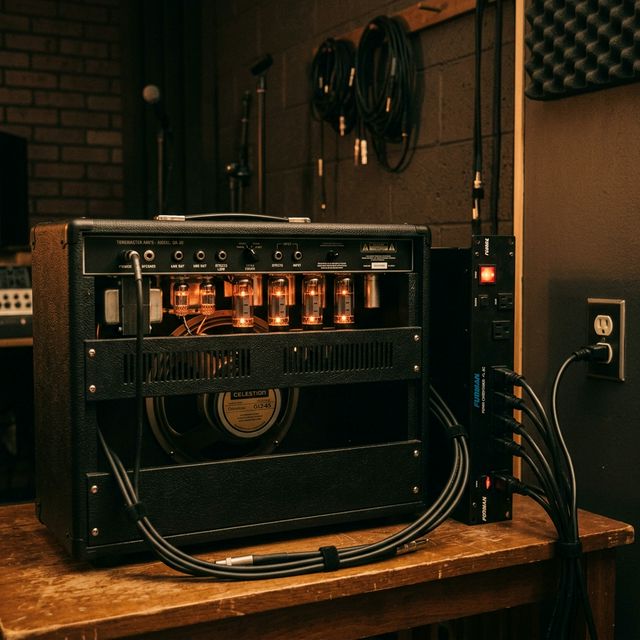
The single biggest lever is power. Ground voltage differences are smallest when all gear shares the same wall circuit, the same breaker, and ideally the same outlet or power strip. Run a heavy-gauge extension from your remote gear back to the main rig’s outlet rather than plugging into the nearest convenience socket.
For pedalboards specifically, an isolated power supply — where each output has its own floating ground rather than sharing a common ground rail — prevents loops between pedals on the same board. This is the same principle behind our guitar pedal power supply guide. If you’re shopping for one, look at isolated pedal power supplies on Amazon and confirm the specifications list “fully isolated” outputs, not merely “regulated,” since a daisy-chain supply is electrically a single shared ground.
Fix 2: Use balanced cabling wherever you can
Balanced connections (XLR and TRS) carry the signal on two conductors plus a separate shield. The receiving device subtracts the two conductors, canceling any noise they picked up in common — a property called common-mode rejection. The shield connects to ground at one point and carries no audio.
The catch: common-mode rejection only works between two balanced devices. If you feed a balanced output into an unbalanced input (or vice versa), you lose the benefit and can re-introduce a loop. For long runs across a room — keyboard to mixer, interface to monitor controller — keep the whole path balanced. Balanced TRS cables let you take advantage of common-mode rejection on any balanced jack.
There’s a related design flaw worth knowing about: the “pin 1 problem,” documented in Neil Muncy’s 1995 Audio Engineering Society paper on noise susceptibility. When a manufacturer ties the cable shield (pin 1 on an XLR) to the audio signal ground instead of the chassis, shield current contaminates the audio. You can’t fix the pin 1 problem from outside the box, but knowing it exists explains why some well-made gear still hums in certain rigs.
Fix 3: Break the loop safely with a ground lift or DI box
Once the loop is in the audio path, the clean fix is to break the ground connection at exactly one point — on the audio side, never the AC side.
- Ground-lift switches. Many DI boxes, direct boxes, and some interfaces have a switch that lifts pin 1 (the shield ground) on an XLR or the sleeve on a TRS. Flip it on the offending connection and the hum should disappear. DI boxes with ground-lift switches are inexpensive and belong in every gig bag.
- Audio isolation transformers. When you can’t lift the ground without losing signal, a 1:1 audio transformer breaks the loop galvanically — there is no electrical connection between input and output, only magnetic coupling. This is what’s inside a passive DI box and inside dedicated hum eliminators. Devices like the audio hum eliminators on Amazon are essentially transformer isolators in a small package. Jensen’s application notes explain why a high-quality transformer preserves frequency response while a cheap one rolls off the low end.
The general rule, repeated in Rane Note 110 and most pro-audio references, is to break the loop in exactly one place. Lift two grounds and you’ve created a new antenna; lift none and the loop persists.
Never lift the AC safety ground
This deserves its own warning. Do not use “cheater” adapters to defeat the third prong on an AC cable, and do not cut the ground pin off a power cord. The AC safety ground exists to trip a breaker if a fault sends live voltage to a metal chassis. Removing it can leave lethal voltage on the case of your amp, microphone, or keyboard with no protection — a documented cause of electrocution, especially when a performer grabs a grounded microphone while holding a grounded guitar. The safety ground is not the source of your audio hum; every fix above addresses the audio ground, which is a separate concern. If a device hums only when its safety ground is connected, the correct response is an audio-side isolation transformer, not a cheater plug.
A prevention checklist
Once your rig is quiet, keep it that way:
- Route all gear through a single, properly grounded power source.
- Use an isolated power supply for pedals, and balanced XLR/TRS for every run longer than a couple of meters.
- Keep a DI box with a ground-lift switch on hand for the inevitable odd venue or borrowed gear.
- Label your cables and document your signal path so the next hum is fast to chase.
- Add hum eliminators only where transformers are genuinely needed — they’re a targeted fix, not a default insertion into every channel.
The bottom line
Ground loops are one of the few studio problems with a clean, deterministic solution: find the loop, break it in one place on the audio side, and keep your AC safety ground intact. Work through power first (single shared circuit, isolated supplies), cabling second (balanced runs, watch the pin 1 problem), and transformers as a last resort, and the hum goes away. The methodology is the same whether you’re tracking in a home studio or running front-of-house — the loop doesn’t care how much the gear cost, only how many ground paths you’ve given it.
Frequently asked questions
Will a power conditioner fix my ground loop? Sometimes, but not for the reason most people assume. A conditioner that filters AC noise can reduce some buzz, but it only solves a true ground loop if it also gives every device a single shared ground reference. A cheap power strip with indicator lights won’t do it; isolation and a shared circuit matter far more than filtering.
Is the hum always 60 Hz? In North America yes (50 Hz in most of the rest of the world). But ground-loop hum is rich in harmonics, so you’ll often hear it as a buzzy 120 Hz rather than a pure low tone, which can be misleading until you recognize the pattern.
Can a bad cable cause the same symptom? A broken shield can cause hum, but it’s usually accompanied by crackling or signal dropouts and won’t respond to ground-lift tests the way a loop will. Swap the cable first to rule it out before chasing grounds.
Is it safe to lift pin 1 on every XLR? Lifting pin 1 on the audio side is generally safe — that’s what the switch is for — but lift only the one connection that is actually part of the loop. Lifting every shield defeats the noise protection balanced cabling is supposed to provide.

Music Gear Specialist Review Desk
Research-based reviewsResearch-based reviews · Manufacturer specs · Verified owner feedback
We review guitars, amps, pedals, and recording gear the honest way: spec sheets, published measurements, and the collected experience of working musicians and verified owners.