Best Audio Interfaces for Mac and Logic Pro X
Upgrading your home studio? We review the best USB-C and Thunderbolt audio interfaces for Mac users prioritizing low latency and premium preamps.
Music Gear Specialist Review Desk
Gear Research & Analysis
ℹ️ Affiliate Disclosure: Music Gear Specialist earns from qualifying purchases through Amazon and other partner links. This doesn't affect our recommendations—we only suggest gear we'd use ourselves.
If you own a modern Mac running Apple Silicon (M1/M2/M3), you already possess one of the most powerful audio processing engines on the planet. But Logic Pro cannot record a physical guitar or a vocal microphone without a translator.
An audio interface takes an analog electrical signal (from your mic or guitar), converts it into a digital signal (zeros and ones) your Mac can understand, and then converts the digital mix back into analog audio for your studio monitors.
Not all interfaces are created equal. If you pair a $3,000 MacBook Pro and a $1,000 microphone with a $40 entry-level interface, your recordings will sound like they were tracked in a tin can. Here are the best audio interfaces for Mac users in 2026, optimized for CoreAudio stability and pristine preamp performance.
What Mac Users Need to Know About Interfaces
Apple’s architectural shift to Apple Silicon fundamentally changed driver stability for audio interfaces. You must ensure the interface you buy has natively written Apple Silicon drivers, or better yet, is “Class Compliant.”
Class Compliant means the interface uses Apple’s built-in CoreAudio drivers natively. You do not have to download proprietary driver software from the manufacturer’s website; you simply plug it in via a USB-C cable, and it instantly appears as an input/output device in Logic Pro. This guarantees massive longevity, as the interface will never become “bricked” by an outdated driver when Apple updates macOS.
Top Picks for Mac Studios
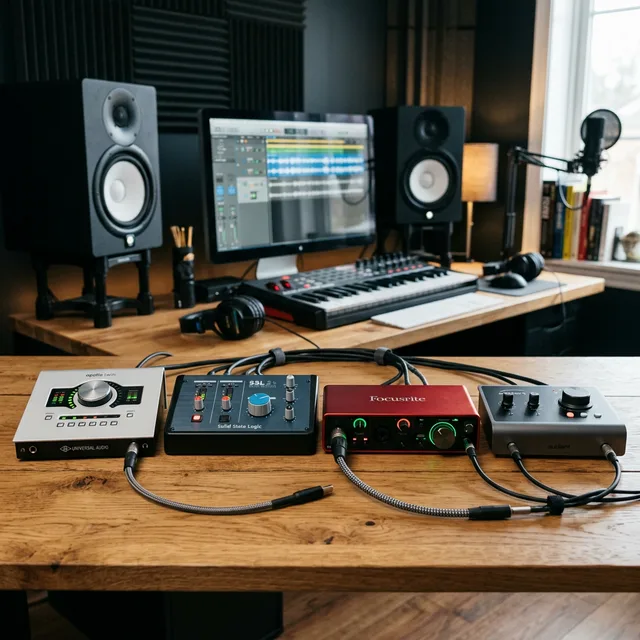
1. Universal Audio Apollo Solo — Best Premium Choice
Universal Audio (UA) is a titan in professional recording studios. The Apollo Solo is their entry-level footprint, bringing their legendary Unison preamp technology to the desktop.
Specs:
- Connectivity: Thunderbolt 3 (Bus-powered)
- Inputs: 2x XLR/TRS Combo
- DSP Processing: Built-in UAD-2 SOLO Core Processor
Pros: The Unison preamps physically alter their impedance to perfectly mimic vintage hardware (like Neve or API consoles) when you use UA plugins. Near-zero latency recording. Cons: Very expensive. The built-in DSP chip is only a single core, meaning you will run out of processing power quickly if you load up too many heavy UAD plugins on your tracks. Requires a Thunderbolt 3/4 port (will not work on standard USB-C ports on older iPads).
2. Focusrite Scarlett 2i2 (4th Gen) — Best Overall Value
The Scarlett 2i2 is the best-selling audio interface in history. Focusrite completely overhauled the preamps and converters for the 4th Generation, narrowing the audio gap between this $200 unit and $1,000 professional racks.
Specs:
- Connectivity: USB-C
- Inputs: 2x XLR/TRS Combo
- Special Features: “Air” Mode, Auto-Gain, Clip Safe
Pros: Extremely user-friendly for beginners. The “Air” mode adds high-end presence to vocals, imitating vintage ISA consoles. Auto-gain listens to you play for 10 seconds and perfectly sets the recording level so you never clip (distort) the signal. Completely Class Compliant with macOS. Cons: The headphone amplifier struggles to drive high-impedance (250+ ohm) audiophile headphones to loud volumes.
3. Audient iD14 MkII — Best Preamp Quality Under $300
If you care solely about raw audio fidelity and don’t care about DSP plugins or auto-gain features, Audient is the choice. They took the exact class-A microphone preamps used in their $50,000 ASP8024 heritage mixing consoles and stuffed them into this desktop box.
Specs:
- Connectivity: USB-C
- Inputs: 2x XLR/TRS Combo (Plus ADAT optical expansion)
- Output: 4x Line Outs, Dual Headphone Outs
Pros: The microphone preamps are noticeably quieter, cleaner, and more transparent than anything else at this price point. It features an ADAT optical input, meaning if you eventually buy an 8-channel lightpipe preamp, you can expand this interface to record 10 simultaneous tracks. Cons: The control software (iD mixer) has a slight learning curve compared to Focusrite’s dead-simple routing.
Do Preamp Specs Actually Matter?
When comparing interfaces, audio companies throw around confusing specs like “Dynamic Range” and “EIN” (Equivalent Input Noise). Do these matter to a bedroom producer?
Yes, but only in specific scenarios.
If you are recording a screaming punk vocalist through a loud microphone like a Shure SM58, the preamp quality barely matters because the source signal is incredibly loud.
However, if you are attempting to record an intimate, whisper-quiet acoustic guitar part using a low-output dynamic microphone (like the infamous Shure SM7B), you have to turn the “Gain” knob on the interface almost all the way to maximum. On a cheap interface, turning the gain to 95% introduces a loud, audible static hiss into the recording (high EIN). A premium interface like the Audient or Apollo provides massive, clean gain with almost no noise floor.
USB-C vs. Thunderbolt: The Latency Myth
Many forums insist that Mac users must buy Thunderbolt interfaces to avoid latency. In 2026, this is factually incorrect for 90% of use cases.
Latency is the delay between you hitting a chord on your guitar, the interface converting it to digital, Logic Pro processing it through an amp-sim plugin, and the audio returning to your headphones.
Modern USB-C (USB 2.0 protocol) can achieve round-trip latency under 4 milliseconds on a modern M-series Mac at a 64-sample buffer size. Human ears cannot detect a delay smaller than roughly 10 milliseconds.
You only explicitly require the massive bandwidth of Thunderbolt if you are trying to record a full 14-piece drum kit simultaneously while streaming samples via an external drive on the same bus. For vocals, guitars, and small setups, a high-quality USB interface is flawless.
Buying notes (what to check before you click)
Listing checks Amazon copy skips. Interface street prices on this page are a research snapshot, not a live offer.
Use-case fit
- Logic Pro, two inputs, class-compliant USB-C: Focusrite Scarlett 2i2 4th Gen. Long write-up: Focusrite Scarlett 2i2 review. Budget-cap sibling: best audio interface under $200. Search the generation, not a used 2nd Gen brick: Scarlett 2i2 4th Gen.
- Clean gain, ADAT expand later, no UAD store: Audient iD14 MkII.
- Unison preamps / UAD plugins on a Thunderbolt Mac: Apollo Solo. That box will not enumerate on a plain USB-C port.
- SM7B or other low-output dynamic: gain is the buy, not Thunderbolt. See Cloudlifter + Scarlett + SM7B.
When to skip / when to buy
- Skip Thunderbolt if the Mac only has USB-C and you track two inputs. Apollo Solo is the wrong cart for that desk.
- Skip a used 2nd/3rd Gen Scarlett titled as if it were 4th Gen. Clip Safe / Auto-Gain / the 4th Gen preamp are generation features.
- Skip an “interface + random condenser + closed cans” bundle if you already own a mic and studio headphones.
- Buy the 2i2 4th Gen if Logic + guitar/vocal is the whole session. Buy iD14 MkII if the next purchase is an 8-channel ADAT preamp.
Listing checks the product title usually omits
- Thunderbolt 3 vs USB-C on the port. Apollo Solo is Thunderbolt. Scarlett and iD14 are USB-C class-compliant. A USB-C cable in the hero shot does not make an Apollo work on an older USB-C-only iPad.
- 4th Gen vs 3rd Gen vs Solo vs 2i2 vs 4i4. Same red faceplate family.
- iD14 MkII vs original iD14. ADAT and headphone count changed.
- Instrument input vs a separate DI. High-gain metal guitar into a line input is a different noise floor than the front-panel Hi-Z.
- Phantom power for condensers, not dynamics. Plain English: what is phantom power.
Wider guitar-recording inventory: best audio interfaces. Next reads: recording hub · best music gear roundups · getting started recording at home.
Related Reading

Music Gear Specialist Review Desk
Research-based reviewsResearch-based reviews · Manufacturer specs · Verified owner feedback
We review guitars, amps, pedals, and recording gear the honest way: spec sheets, published measurements, and the collected experience of working musicians and verified owners.