Best MIDI Keyboard for Beginners and Producers
The 7 best MIDI keyboards for beginners and music producers in 2026. Budget picks, workflow tips, and what features actually matter.
Music Gear Specialist Review Desk
Gear Research & Analysis
ℹ️ Affiliate Disclosure: Music Gear Specialist earns from qualifying purchases through Amazon and other partner links. This doesn't affect our recommendations—we only suggest gear we'd use ourselves.
Clicking notes into a piano roll with your mouse is the slowest, most soul-crushing way to make music on a computer. A MIDI keyboard lets you play melodies, chords, and drum patterns with your hands, and that physical connection to the music changes everything about how quickly you work and how musical your productions sound.
The MIDI keyboard market is flooded with options ranging from $40 mini controllers to $800 professional workstations. Most beginners and home producers need something in the $60-$250 range that integrates cleanly with their DAW and does not take up their entire desk.
I tested these keyboards with Ableton Live, Logic Pro, FL Studio, and Reaper to verify compatibility, latency, and workflow integration across the most popular DAWs. Every keyboard on this list works plug-and-play with all four without driver issues.
What Features Actually Matter
Key Count and Size
MIDI keyboards come in 25, 32, 37, 49, 61, and 88 key configurations. Here is a practical guide:
25 mini keys: Fits in a backpack. Great for beat-making and melody sketching on the go. Too small for playing chords comfortably or learning piano. Best paired with drum pads for hip-hop and electronic production.
49 full-size keys: The sweet spot for most producers. Four octaves covers the range of most instrumental parts. Full-size keys let you play proper chord voicings and two-handed parts. Fits on a standard desk with room for a monitor and mouse.
61 full-size keys: Five octaves gives you the range to play piano parts, organ parts, and wide string arrangements without octave-shifting mid-performance. Requires a dedicated keyboard stand or a large desk.
88 weighted keys: Full piano range with weighted hammer action. Only necessary for trained pianists who want authentic piano feel. These keyboards are heavy (30-50 pounds), expensive ($400+), and take up serious space.
Drum Pads
Velocity-sensitive rubber pads let you finger-drum beats, trigger samples, and launch clips. Even if you do not make hip-hop, pads are useful for triggering sound effects, one-shot samples, and loop sections during production. Eight pads is standard on most controllers.
Knobs, Faders, and Controls
Assignable knobs and faders give you physical control over your DAW’s virtual parameters: volume, panning, filter cutoff, reverb send, and anything else you can map. This eliminates the need to reach for your mouse during creative flow. Eight assignable knobs is the standard; some larger keyboards include faders and transport controls as well.
DAW Integration
Some keyboards have built-in DAW-specific modes that auto-map controls to your software’s mixer, transport, and plugin parameters. The Novation Launchkey series integrates deeply with Ableton Live. The Akai MPK series pairs with MPC Beats. The Arturia KeyLab series maps seamlessly with Arturia’s Analog Lab software. If you use a specific DAW, check whether the keyboard offers native integration before buying.
The 7 Best MIDI Keyboards for Beginners
1. Novation Launchkey 49 MK3 - Best Overall
The Launchkey 49 MK3 is the most complete 49-key controller at its price point. The integration with Ableton Live is seamless: session mode turns the 16 velocity-sensitive pads into a clip launcher, the faders control the mixer, and the knobs auto-map to the selected plugin’s parameters. If you use Ableton, this is the keyboard to buy.
The keys have a satisfying synth-action feel with enough resistance for expressive playing but enough speed for rapid passages. The pitch and mod strips (flat touch strips instead of wheels) are a personal preference, but they save lateral space on your desk.
The bundled Ableton Live Lite, virtual instruments, and sample packs provide a complete production starter kit for $230.
Novation Launchkey 49 MK3 on Amazon
2. Akai MPK Mini MK3 - Best Budget Pick
The MPK Mini MK3 is the most popular MIDI controller in the world for good reason. Twenty-five mini keys, eight MPC-style drum pads, eight assignable knobs, a built-in arpeggiator, and a joystick for pitch/mod control, all packed into a controller that fits next to your laptop.
The mini keys take some adjustment if you have full-size keyboard experience, but for programming melodies and bass lines, they work fine. The drum pads are the real star: responsive, velocity-sensitive, and perfectly sized for finger drumming. They feel like proper MPC pads, not the mushy pads on cheaper controllers.
At $100, this is the entry point for music production. Pair it with a home recording setup and you have a complete production workstation.
3. Arturia KeyLab Essential 49 MK3 - Best Software Bundle
Arturia’s KeyLab Essential 49 MK3 ships with Analog Lab, which includes over 2,000 synthesizer and keyboard presets from Arturia’s acclaimed V Collection. This software alone retails for $100, making the $230 keyboard price effectively $130 for the hardware.
The keyboard auto-maps every knob and fader to Analog Lab’s parameters, turning the controller into a self-contained instrument workstation. The DAW integration mode also works well with Ableton, Logic, and FL Studio, though not as deeply as the Novation’s Ableton integration.
The keys feel slightly better than the Novation’s at this price point, with a more balanced weight that responds well to dynamic playing. If the bundled software appeals to you, this is the best value on the list.
Arturia KeyLab Essential 49 MK3 on Amazon
4. M-Audio Keystation 61 MK3 - Best 61-Key Budget Option
If you want 61 full-size keys without spending $300+, the Keystation 61 MK3 delivers at $130. The trade-off is minimal: no drum pads, no assignable knobs, and a basic semi-weighted keybed that feels passable but uninspiring.
What you get is five octaves of full-size keys with velocity sensitivity, pitch and mod wheels, and plug-and-play compatibility with every DAW. This is the keyboard for players who want to play, not produce. If your primary use case is performing piano parts, organ parts, and string arrangements, the Keystation’s simplicity is a feature, not a limitation.
M-Audio Keystation 61 MK3 on Amazon
5. Native Instruments Komplete Kontrol A49 - Best for NI Users
If your production workflow revolves around Native Instruments software (Kontakt, Massive, Battery, FM8), the Komplete Kontrol A49 integrates so deeply that it feels like the software was designed for this keyboard, because it was. The NKS (Native Kontrol Standard) protocol auto-maps every parameter from compatible plugins to the keyboard’s knobs and displays the plugin name and preset info on the keyboard’s OLED screens.
The bundled Komplete Start software package includes thousands of sounds, instruments, and effects for free. Combined with the Maschine Essentials integration, this creates a production ecosystem that rewards staying within the NI universe.
NI Komplete Kontrol A49 on Amazon
6. Nektar Impact LX49+ - Best DAW Integration Breadth
The Nektar Impact LX49+ offers pre-configured integration with more DAWs than any other keyboard at its price: Ableton, Logic, FL Studio, Cubase, GarageBand, Reaper, Bitwig, Studio One, and Reason. If you switch between DAWs or use something less popular than Ableton, Nektar’s broad compatibility is a genuine advantage.
The keybed is decent, the eight pads are responsive, and the eight knobs and nine faders give you plenty of physical control surface. At $150, it undercuts the Novation and Arturia while offering comparable functionality.
7. Novation Launchkey Mini MK3 - Best Portable Controller
The Launchkey Mini MK3 packs 25 mini keys and 16 velocity-sensitive pads into a controller that weighs less than two pounds. The Ableton integration mirrors the larger Launchkey, so you get clip launching, session navigation, and parameter control from a unit that fits in a messenger bag.
The 16 pads (compared to the MPK Mini’s 8) make this the better choice for beat-making and clip-launching workflows. The keys are comparable to the MPK Mini’s in feel. The deciding factor between these two usually comes down to Ableton integration (Launchkey wins) vs. standalone versatility (MPK Mini wins).
Novation Launchkey Mini MK3 on Amazon
Setting Up Your MIDI Keyboard for Music Production
- Connect via USB. Most MIDI keyboards are USB bus-powered, meaning one cable handles both data and power. Plug it in and your DAW should recognize it automatically.
- Select the keyboard as your MIDI input in your DAW’s preferences/settings.
- Load a virtual instrument on a MIDI track (piano, synth, or drum kit).
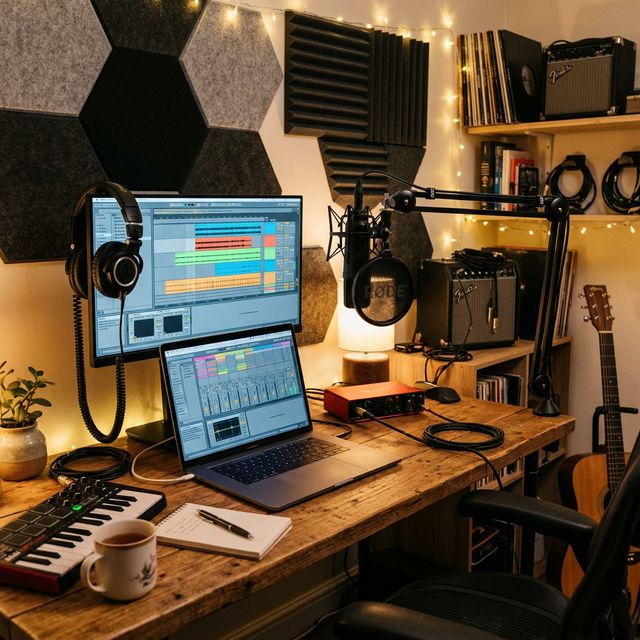
- Play. The keyboard sends note data to the virtual instrument, which generates the sound through your audio interface and into your headphones or speakers.
- Map the controls. Assign the knobs and faders to your most-used parameters. Most DAWs support MIDI learn: click a parameter, twist a knob, and the mapping is saved.
If your keyboard has noticeable latency (delay between pressing a key and hearing the sound), reduce your audio buffer size in your DAW’s audio settings. A buffer of 128 or 256 samples at 44.1kHz gives you latency under 10 milliseconds, which is undetectable for most players.
Do You Need a MIDI Keyboard If You Play Guitar?
Yes. Even if guitar is your primary instrument, a MIDI keyboard opens up production capabilities that a guitar cannot provide efficiently. Programming drum parts, playing bass lines, triggering synth pads, and composing string arrangements are all faster and more intuitive with a keyboard controller than with a mouse.
A 25-key mini controller ($60-$100) sitting next to your audio interface gives you instant access to every virtual instrument in your DAW. It is one of the highest-value additions to a home studio, second only to the interface itself.
Buying notes (what to check before you click)
Listing checks Amazon copy skips. Street prices on this page are a research snapshot, not a live offer.
Use-case fit
- Beats, bass lines, backpack studio: 25 mini keys (MPK Mini MK3, Launchkey Mini). The long MPK write-up is the Akai MPK Mini MK3 review.
- Two-handed chords on a desk: 49 full-size (Launchkey 49, KeyLab Essential 49).
- Piano / organ parts without pads: Keystation 61.
- Ableton clip launching: Launchkey family. NI / Kontakt ecosystem: Komplete Kontrol A49.
When to skip / when to buy
- Skip 88-key weighted if you produce beats on a laptop. You are buying furniture, not a controller.
- Skip a second keyboard if you do not have speakers or headphones yet. Hear the instruments on studio monitors under $300 first.
- Skip this page entirely if the only goal is guitar tone. That cart is budget guitar pedals, a delay pedal, or a multi-effects unit.
- Buy the MPK Mini or Launchkey Mini if desk space is the constraint. Mini keys will not teach piano technique.
Listing checks the product title usually omits
- Mini keys vs full-size. “49” on a Mini-series listing is not a full-size 49-key KeyLab.
- MK3 vs MK2 vs “Plus” bundles. Software versions (Live Lite vs Analog Lab vs Komplete Start) change by SKU. Confirm the generation in the photo.
- USB class-compliant vs extra drivers. Most of this list is bus-powered USB. A “MIDI keyboard” search also returns old 5-pin-only units that need a separate interface.
- Aftertouch, pitch wheels vs touch strips, and whether pads are included. Keystation 61 has no pads.
The keyboard does not make sound. You still need an interface — best audio interface under $200 — and a monitoring path. Next reads: recording hub · best music gear roundups · getting started recording at home.
Related Reading
Music Gear Specialist Review Desk
Research-based reviewsResearch-based reviews · Manufacturer specs · Verified owner feedback
We review guitars, amps, pedals, and recording gear the honest way: spec sheets, published measurements, and the collected experience of working musicians and verified owners.