How to Set Up a Home Recording Studio on a Budget
Build a home recording studio for under $500. Exact gear list, room setup tips, and software picks from a working musician and producer.
Music Gear Specialist Review Desk
Gear Research & Analysis
ℹ️ Affiliate Disclosure: Music Gear Specialist earns from qualifying purchases through Amazon and other partner links. This doesn't affect our recommendations—we only suggest gear we'd use ourselves.
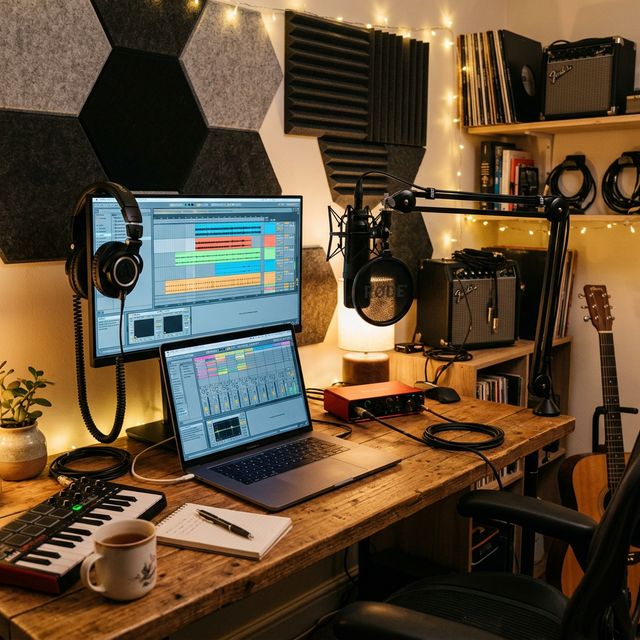
The internet is full of home studio guides that casually recommend $3,000 worth of gear before you have recorded a single note. That approach is backwards. I built my first home studio for under $400 in a spare bedroom with a card table for a desk, and the recordings I made there landed me session work that paid for every upgrade that followed.
The truth about home recording in 2026 is this: the gear floor has never been lower. A $150 audio interface today outperforms a $1,000 interface from 2010. Free and budget software rivals professional studio tools. The only expensive thing you actually need is knowledge, and that is free if you are willing to put in the hours.
Here is the exact gear list, setup process, and software stack to get you recording at home for under $500, with every dollar allocated where it matters most.
The Essential Gear List (Under $500 Total)
Audio Interface ($100-$170)
The interface is your studio’s central hub. Everything passes through it: microphones, instruments, headphones, and monitor speakers. Do not cut corners here.
Best budget pick: The Focusrite Scarlett Solo ($120) gives you one mic preamp and one instrument input with clean, low-noise conversion at 24-bit/192kHz. The preamps are quiet enough for condenser microphones without audible hiss, and the direct monitoring feature eliminates latency while tracking.
Best mid-range pick: The Focusrite Scarlett 2i2 ($170) adds a second input for recording two sources simultaneously (guitar and vocals, stereo mic pairs, or two musicians at once). If your budget allows it, the second input is worth the extra $50 because you will eventually need it. Our Scarlett 2i2 review covers the 4th Gen features in more detail.
Both interfaces are class-compliant on Mac (no driver installation required) and work flawlessly with every major DAW. If your interface is not being detected by your computer, check our troubleshooting guide before panicking.
Microphone ($70-$100)
You need one good condenser microphone to start. Large-diaphragm condensers capture vocals, acoustic guitars, and room ambience with warmth and detail that dynamic microphones cannot match at this price point. They also need 48V phantom power from the interface.
Best budget pick: The Audio-Technica AT2020 ($80) is the industry-standard budget condenser. It has a slightly bright, detailed character that cuts through a mix and flatters most vocal types. Thousands of professional recordings have been made with this microphone.
Upgrade pick: The Rode NT1-A ($230) is one of the quietest condenser microphones ever made, with a self-noise spec of 5dBA. If you record quiet acoustic instruments or soft vocals, the ultra-low noise floor is worth the premium.
Headphones ($50-$80)
You need closed-back headphones for tracking (recording) and optionally open-back headphones for mixing. Start with a closed-back pair that does both jobs adequately.
Best pick: The Audio-Technica ATH-M50x ($150) are the studio workhorse. Flat response, comfortable for long sessions, and they fold flat for transport. For tighter budgets, the Audio-Technica ATH-M20x ($50) delivers honest sound quality at a fraction of the price. Read our studio headphones guide for more options.
Cables, Stand, and Accessories ($45-$70)
- XLR cable (for the microphone): $15-$20 for a 10-foot cable. Buy from a reputable brand like Hosa or Amazon Basics. Avoid the cheapest no-name cables because a broken solder joint inside will cause intermittent crackling that is maddening to diagnose.
- Mic stand: $25-$35 for a boom arm stand that adjusts to any position. Desktop arm stands work great for small rooms.
- Pop filter: $10-$15. Eliminates plosive consonants (P and B sounds) that overload the microphone capsule and ruin vocal takes.
Total Cost: $335-$470
That covers everything you need to start recording today. No monitor speakers yet (use headphones first), no acoustic treatment (use blankets), and no fancy desk (use any flat surface).
Setting Up Your Room
You do not need a dedicated room, but you do need to think about the space you are using.
Noise and Reflections
Hard, flat surfaces reflect sound waves. In a small untreated room, these reflections bounce between parallel walls and create standing waves that color your recordings with boxy, hollow overtones. You hear it as a “room sound” that makes vocals sound like they were recorded in a bathroom.
Free fixes:
- Record in a room with carpet or a thick area rug. Hard floors are the worst reflectors.
- Hang a heavy blanket or moving blanket behind the microphone position. This absorbs reflections from the wall behind you.
- Place bookshelves filled with irregularly sized books against bare walls. The uneven surfaces scatter reflections instead of bouncing them back directly.
- Record in a closet full of clothes for the driest vocal sound possible. This sounds ridiculous but works extremely well for voiceover and vocal recording.
Budget acoustic treatment ($100-$200): When you are ready to invest, acoustic foam panels at the first reflection points (the spots on the walls where sound bounces from your speakers to your ears) make the biggest difference. A reflection filter behind the microphone ($50-$80) isolates the mic from room sound without treating the entire room.
Computer Requirements
You do not need a powerful computer to record music. Any laptop or desktop from the last five years with 8GB of RAM and an SSD can handle 16+ tracks of audio recording with effects processing. The audio interface does the heavy lifting of analog-to-digital conversion, so your CPU only needs to handle playback and plugin processing.
If you experience crackling or dropouts during recording, the issue is almost always the audio buffer size setting in your DAW, not your computer’s processing power. Increase the buffer size to 256 or 512 samples for tracking, and lower it only when you need real-time monitoring with plugins. Our latency troubleshooting guide covers this in detail.
Choosing Your DAW (Software)
The DAW (Digital Audio Workstation) is the software you record, edit, and mix in. Here are the best options ranked by value:
Free tier:
- GarageBand (Mac): Genuinely powerful. Built-in instruments, amp simulations, and effects that rival paid plugins. Many hit songs started as GarageBand projects.
- BandLab: Browser-based, free forever, includes collaboration features and a mobile app. Surprisingly capable for being entirely free.
- Audacity: Best for simple audio recording and editing. Not a full music production DAW but perfect for podcasts, voiceover, and basic music recording.
Budget tier ($60-$200):
- Reaper ($60): Full-featured professional DAW with an unlimited evaluation period. The interface is not pretty, but the functionality rivals Pro Tools and Logic.
- PreSonus Studio One Artist ($100): Bundled free with PreSonus interfaces. Clean interface, built-in instruments, and a drag-and-drop workflow that beginners love.
Professional tier ($200-$600):
- Ableton Live ($250-$750): The standard for electronic music production and live performance.
- Logic Pro ($200, Mac only): Apple’s professional DAW with an absurd amount of included instruments, effects, and sample libraries.
Start with whatever free DAW came bundled with your audio interface. You can always switch later, and the recording skills transfer between all DAWs.
Your First Recording Session: Step by Step
- Connect the interface to your computer via USB. Install drivers if prompted (Mac usually does not need them).
- Open your DAW and select the audio interface as your input and output device in the audio preferences.
- Create a new track and set the input to your interface’s channel 1.
- Set your levels. Sing or play into the microphone at your loudest expected volume. Adjust the gain knob on the interface until the input meter peaks around -12dB to -6dB. This leaves headroom for dynamic peaks without clipping.
- Arm the track for recording (usually a red button on the track).
- Hit record and perform.
- Listen back through headphones and evaluate. If you hear room reflections, reposition your blankets. If you hear hiss, lower the gain and move closer to the microphone.
That is it. Your first recording will not be perfect, and that is expected. The skill of recording develops over hundreds of sessions, and no amount of expensive gear substitutes for experience.
The Upgrade Path
Once you have outgrown your initial setup, here is the order I recommend upgrading:
- Studio monitors ($200-$400 for a pair). Mixing on headphones is possible but fatiguing and less accurate for bass frequencies. Even budget monitors like the PreSonus Eris E3.5 give you a more reliable mixing reference than headphones. When you are ready to upgrade from tiny speakers, use our studio monitors under $500 comparison to match woofer size to your room.
- Acoustic treatment ($100-$300). Panels at first reflection points and bass traps in corners transform your room from a liability into an asset.
- A second microphone for stereo recording or simultaneous multi-source tracking.
- Better plugins for mixing (EQ, compression, reverb). Free plugins from TDR, Valhalla Supermassive, and Analog Obsession are professional quality.
Resist the urge to upgrade everything at once. Each upgrade gives you a new variable to learn and integrate into your workflow. Master one piece of gear before buying the next.
Related Reading
Music Gear Specialist Review Desk
Research-based reviewsResearch-based reviews · Manufacturer specs · Verified owner feedback
We review guitars, amps, pedals, and recording gear the honest way: spec sheets, published measurements, and the collected experience of working musicians and verified owners.