How to Reduce Pedalboard Noise: A Guitarist's Fix Guide
Kill pedalboard hum, buzz, and hiss for good. Covers power isolation, signal chain order, cable quality, and gain staging for a silent rig.
Music Gear Specialist Review Desk
Gear Research & Analysis
ℹ️ Affiliate Disclosure: Music Gear Specialist earns from qualifying purchases through Amazon and other partner links. This doesn't affect our recommendations—we only suggest gear we'd use ourselves.
A silent pedalboard is not about buying expensive pedals, it is about understanding where noise comes from and eliminating it at the source. Every pedalboard has multiple potential noise entry points: the power supply, the cables, the signal chain order, the gain staging, and even the physical layout on the board.
The frustrating truth is that noise compounds. A small amount of hum from the power supply plus a mediocre patch cable plus an overdrive pedal amplifying both equals a wall of buzz that makes recording impossible and gigging embarrassing.
TL;DR: The four biggest noise sources on a pedalboard are (1) non-isolated power supply, (2) bad or long patch cables, (3) gain pedals amplifying upstream noise, and (4) ground loops from mixing power circuits. Fix those four things and your board will be 90% quieter. A noise gate handles the remaining 10%.
The Noise Audit: Find Your Problem
Before fixing anything, identify where the noise comes from. This systematic process takes five minutes and saves hours of guessing.
The Elimination Test
- Bypass all pedals. Connect your guitar directly to your amp with a single cable. Note the noise level, this is your baseline.
- Add pedals one at a time. Start from the amp end of your chain and add pedals backward toward the guitar.
- Each time you add a pedal, note whether the noise increases. The pedal that causes the biggest jump is your primary problem.
- Test with pedals on and off. Some pedals add noise even when “bypassed” if they use buffered bypass (Boss, TC Electronic, and many others).
What the Noise Sounds Like
| Sound | Likely Source |
|---|---|
| Low hum (60Hz drone) | Ground loop or power supply issue |
| High-pitched whine or squeal | Digital noise bleeding through shared power |
| Hiss (white noise) | Gain pedal amplifying cable/pickup noise |
| Buzz that changes with movement | EMI from lights, screens, or wall wiring |
| Crackle or pop | Bad cable connection, cold solder joint |
| Motorboating (rhythmic pulse) | Oscillation from pedal interaction |
Fix 1: Upgrade Your Power Supply
This is the single most impactful change you can make for pedalboard noise reduction. If you are running a daisy chain or a cheap wall adapter, this alone may solve your problem entirely.
Why Daisy Chains Are Noisy
A daisy chain connects multiple pedals to one power output. All pedals share a single ground connection and a single power line. When a digital pedal’s internal clock generates electrical noise, that noise travels through the shared ground directly into every other pedal on the chain.
Analog pedals are particularly sensitive to this, an overdrive pedal will amplify the digital clock noise from a delay or reverb pedal on the same daisy chain, turning a faint whine into an audible squeal.
The Isolated Power Supply Solution
An isolated power supply gives each output its own independent power regulation. There is no shared ground between outputs, so noise from one pedal cannot reach another. It is the single most effective noise reduction tool available.
| Supply | Outputs | Price | Best For |
|---|---|---|---|
| Truetone 1 Spot Pro CS6 | 6 isolated | $100 | Small boards |
| Voodoo Lab Pedal Power 2+ | 8 isolated | $180 | Standard boards |
| Cioks DC7 | 7 isolated | $200 | Expandable systems |
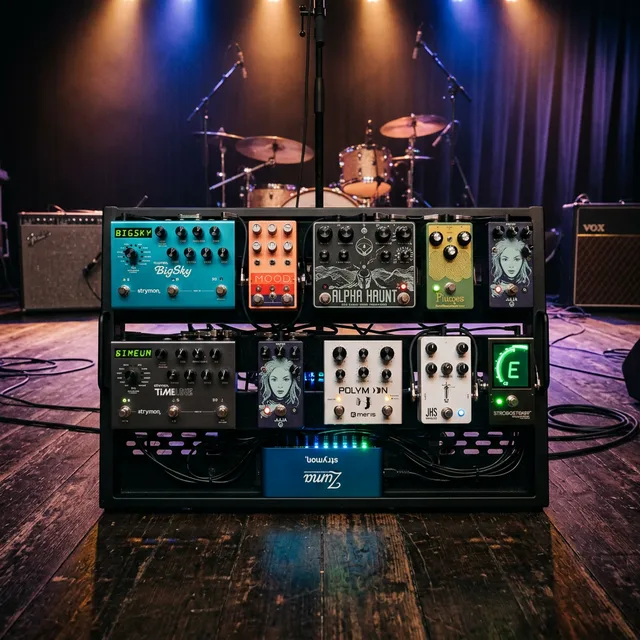
| Strymon Zuma | 5 high-current | $250 | Power-hungry digital pedals |
For detailed power supply comparisons and compatibility info, see our pedal power supply compatibility guide.
Fix 2: Optimize Your Signal Chain Order
The order of pedals in your signal chain directly impacts noise. The core principle: gain pedals amplify everything before them. Anything noisy upstream of a distortion pedal gets amplified.
The Standard Low-Noise Signal Chain
- Tuner, first in chain (can act as a mute)
- Wah / Filter, wants to see guitar signal directly
- Compressor, evens dynamics before gain
- Overdrive / Distortion / Fuzz, gain pedals in order of intensity (lightest first)
- Noise Gate, immediately after the last gain pedal
- Modulation (chorus, phaser, flanger)
- Delay
- Reverb, last in chain
Why This Order Reduces Noise
- The noise gate sits right after gain pedals, catching amplified noise before it reaches time-based effects. A noise gate after reverb would chop off your reverb tails.
- Modulation, delay, and reverb go after gain so they process a clean, gated signal. If delay came before distortion, the distortion would amplify the delay’s noise floor.
- Compressor before gain evens out your dynamics before the overdrive, but since the compressor’s own noise gets amplified by the gain pedal, make sure your compressor is a low-noise unit.
The Effects Loop Option
If your amp has an effects loop, run time-based and modulation pedals in the loop:
- Front of amp: Tuner → Wah → Compressor → Overdrive → Distortion → Noise Gate
- Effects loop: Modulation → Delay → Reverb
This separates the pedals that come before your amp’s preamp from those that come after, reducing the amount of noise that the amp’s gain stage amplifies.
Fix 3: Upgrade Your Cables
Cheap patch cables are silent tone and noise killers. The shield in a cable blocks electromagnetic interference, when that shield is thin, poorly connected, or degraded, interference gets in.
Patch Cable Quality Checklist
- Shield type: Braided shields provide 90-98% coverage. Spiral-wound shields (used in cheap cables) develop gaps as the cable flexes.
- Connector quality: Gold-plated or nickel-plated contacts resist corrosion. Cheap tin-plated contacts oxidize and create noise.
- Cable length: Use the shortest cable that reaches. Every extra inch is an antenna.
- Soldered vs. solderless: Both can be quiet if built well. Solderless systems (Evidence Audio SIS, Lava Tightrope) offer flexibility but must be assembled carefully, a poorly seated connector is noisy.
Recommended Patch Cable Brands
| Brand | Type | Price Per Cable | Notes |
|---|---|---|---|
| Evidence Audio SIS | Solderless | $8-12 | Low capacitance, great shielding |
| Lava Tightrope | Solderless | $6-10 | Very thin, easy to route |
| Mogami Gold | Soldered | $12-20 | Studio standard |
| EBS Gold Flat | Soldered, flat | $10-15 | Flat design saves space |
For a full cable guide, check our best guitar cables roundup.
Fix 4: Use a Noise Gate Correctly
A noise gate is the last line of defense, it silences noise between notes but does not remove noise while you are playing. Fix the root causes first (power, cables, chain order), then use a gate to clean up the remaining noise floor.
How to Set a Noise Gate
Threshold: The volume level below which the gate silences the signal.
- Stop playing and listen to the noise from your rig.
- Start the threshold at minimum and slowly raise it until the noise disappears.
- Play a chord and let it sustain, if the gate cuts off the tail too abruptly, lower the threshold slightly.
Decay/Release: How quickly the gate closes after the signal drops below threshold.
- Set to a medium value as a starting point.
- Play staccato notes, the gate should close between notes without chopping the attack of the next note.
- Play sustained notes, the gate should not cut off the sustain prematurely.
- Adjust until both feel natural.
Noise Gate Placement
After gain pedals (standard): Catches noise amplified by overdrive and distortion. This is the most common and effective placement.
In the effects loop (advanced): Some players run the gate’s “send” from the effects loop and “return” before the amp input. This lets the gate respond to the signal level after the amp’s preamp gain, providing more accurate noise detection. The ISP Decimator G String and Boss NS-2 are designed for this four-cable method.
Recommended Noise Gates
- ISP Decimator II ($130), transparent, no tone loss, tracks fast
- Boss NS-2 ($100), built-in effects loop, sturdy
- TC Electronic Sentry ($100), multiband gating, TonePrint custom settings
- Electro-Harmonix Silencer ($65), budget option with effects loop
Fix 5: Physical Board Layout
The physical arrangement of pedals and cables on your board affects noise more than most players realize.
Keep Power Cables Away from Audio Cables
Power cables and audio cables should cross at 90-degree angles, never run parallel. Parallel runs allow electromagnetic coupling, the power cable induces noise into the audio cable. If they must run side by side, keep at least 2-3 inches of separation.
Secure Everything
Loose cables and pedals create intermittent connections that produce crackling and popping. Velcro-mount every pedal firmly. Secure cables with cable ties or adhesive cable guides. A cable that shifts under foot pressure during a gig can create noise at the worst possible moment.
Shield Your Board
If you play in electrically noisy environments (stages with lots of lighting, old buildings with poor wiring), consider a pedalboard with a metal base plate. The metal acts as a Faraday cage, shielding pedals from external EMI. The Pedaltrain series and similar aluminum boards provide some inherent shielding.
The Complete Noise Reduction Checklist
Work through this list in order. Each step builds on the previous one:
- Power supply: Isolated, properly rated for each pedal’s voltage and current
- Cables: Quality patch cables, shortest possible length, braided shields
- Signal chain: Standard order (gain before time-based, gate after gain)
- Gain staging: No pedal running hotter than necessary
- Physical layout: Power and audio cables separated, everything secured
- Noise gate: Threshold set just above noise floor, decay adjusted for natural feel
- Environment: Distance from lights, screens, dimmers, and wall adapters
When Your Board Is Still Noisy
If you have addressed everything above and noise persists:
- Test each pedal individually with a known-good cable and power supply. Some pedals are inherently noisy, vintage fuzz circuits, certain overdrive designs, and old digital pedals with dated converters all have higher noise floors than modern designs.
- Check your guitar. Unshielded pickup cavities, failing pots, and corroded input jacks add noise before the signal ever reaches your board. See our guide on how to reduce guitar amp hum for guitar-side troubleshooting.
- Check your amp. A noisy amp amplifies board noise. See our tube vs solid state amps guide for amp-specific noise diagnostics.
Final Thoughts
A quiet pedalboard is a solved problem, not a mystery. Isolated power, quality cables, correct signal chain order, and a properly set noise gate eliminate virtually all pedalboard noise. The investment is modest (an isolated power supply and decent cables total $150-250) and the improvement is dramatic.
The key mindset shift: stop thinking of noise as inevitable and start thinking of it as a diagnostic clue. Every type of noise has a specific cause with a specific fix. Identify the sound, trace it to the source, and eliminate it. Your recordings will be cleaner, your live sound will be tighter, and you will stop fighting your gear and start playing music.

Music Gear Specialist Review Desk
Research-based reviewsResearch-based reviews · Manufacturer specs · Verified owner feedback
We review guitars, amps, pedals, and recording gear the honest way: spec sheets, published measurements, and the collected experience of working musicians and verified owners.